Receivables ageing, P&L, balance sheet, trial balance, expense heads, tax ledgers, stock ageing, dead and slow-moving stock, top customers and top products. Riko keeps more than twenty-five reports live from your Tally, so the one you need is already there. Need a different cut? Tell it what to change, and the table reshapes while the figures stay exactly as your books say.
Ageing, P&L, balance sheet, trial balance, expense heads, tax ledgers, stock ageing, dead stock, top customers and products, all synced from Tally every few minutes.
Live from Tally"Add the due date column." "Show last financial year." "Group by city." Riko changes the table, never the figures, which always come from your ledgers.
Shape this viewDownload Excel, a PDF formatted for print and WhatsApp, or a CSV. Share it, or save the view so it opens the same way next month.
Excel · PDF · CSV · saved viewsReports are grouped the way you think about the books: receivables and payables, statements, stock, cost centres, sales. Your saved views sit at the top. Every report is already built from your synced Tally data, so there's nothing to set up.
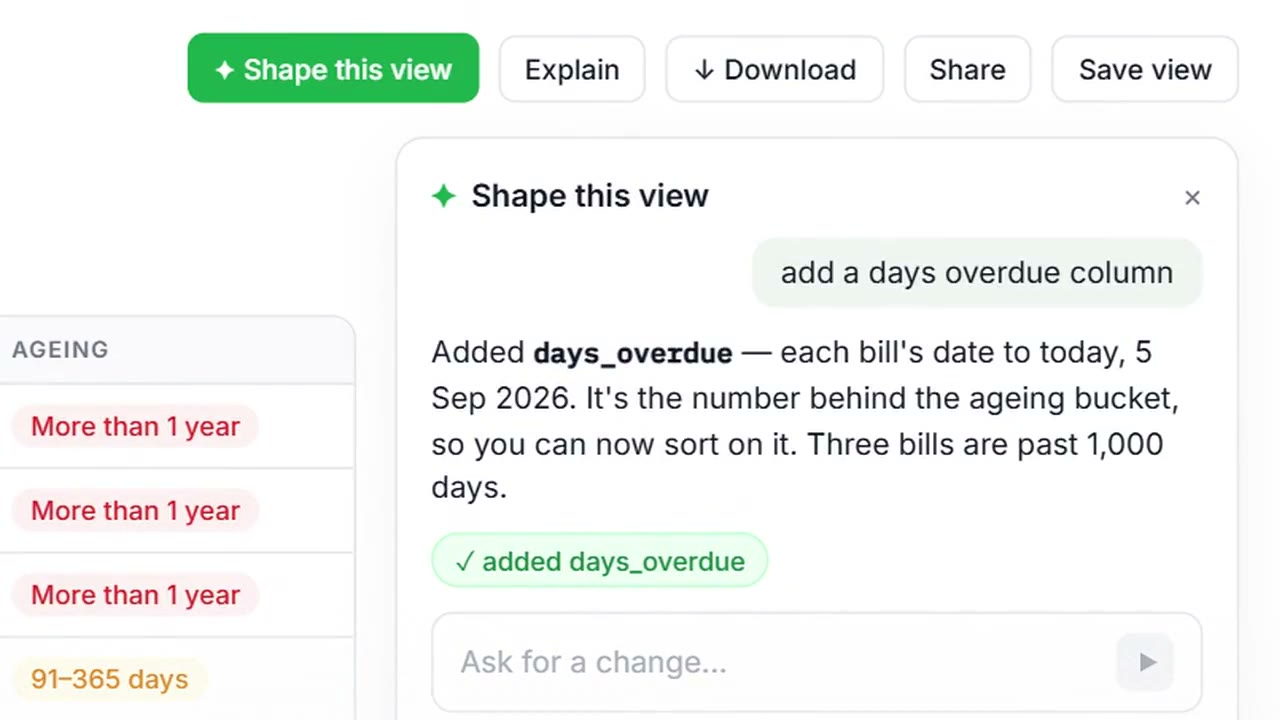
Change the period, columns or chart from the toolbar, or open Shape this view and say what you want: "add a days overdue column", "only bills over 90 days", "compare with last year". The table changes in front of you, and Riko says what it changed.
Use Explain to see how a figure was built. Every number traces back to the vouchers in your Tally.
Excel for your accountant, a PDF formatted for print and WhatsApp, a CSV for your own analysis, or a saved view that opens the same way next month.
On the 7th, your CA asks for the receivables ageing.
It's already there. Add the days-overdue column, download the Excel and send it. Two minutes, no Tally export.
Month-end and the owner wants the P&L next to last year's.
"Compare with last financial year" in Shape this view, save the view, and it opens that way every month from now on.
The bank asks which customers make up most of your receivables.
The top-customers report, grouped and sorted the way the bank wants, as a PDF ready for print.
Receivables and payables ageing, customer and supplier advances, loans outstanding, P&L, balance sheet, ledger account, expense heads, tax ledger balances (GST, TDS and TCS), cash flow, trial balance, balances by group, sales register by month, top customers and products, stock on hand, stock ageing, dead and slow-moving stock, and cost-centre reports. That's more than 25 in all, every one live from your Tally.
You type what you want changed, such as "add a days overdue column", "show last financial year" or "group by city", and Riko changes the table. It changes columns, periods, grouping and sorting. It never changes a figure; every figure comes from Tally.
Yes. Download it as Excel (.xlsx), as a PDF formatted for print and WhatsApp, or as a CSV of the raw values. You can also share it or save the view.
Once a report is shaped the way you like it, with your period, columns and grouping, save it. Next month it opens the same way, with the new figures.
For reading, no. Riko syncs your Tally every few minutes and keeps the reports current. You keep using Tally for entries as you do today.
It should be, because it's read from your Tally. Every report notes that its figures are from Tally and never edited by Riko. If a number doesn't match, Riko flags it rather than smoothing it over.
All 25+ reports and Shape this view are in every plan, starting with Basic.