Purchase bills pile up in a drawer, a WhatsApp chat or an email inbox until someone has time to key them in, line by line. Riko's AI reads them for you. Upload a photo, a PDF or a purchase register, and Riko finds the party, invoice number, date, items, tax and totals, matches them to your Tally ledgers and drafts the voucher. You check each figure against the document, confirm, and it goes to Tally on the next sync with your name against it.
AI-powered OCR picks up the party, GSTIN, invoice number, date, line items, tax and totals from a phone photo, a PDF, or an Excel or CSV register, and lays them out as a draft voucher.
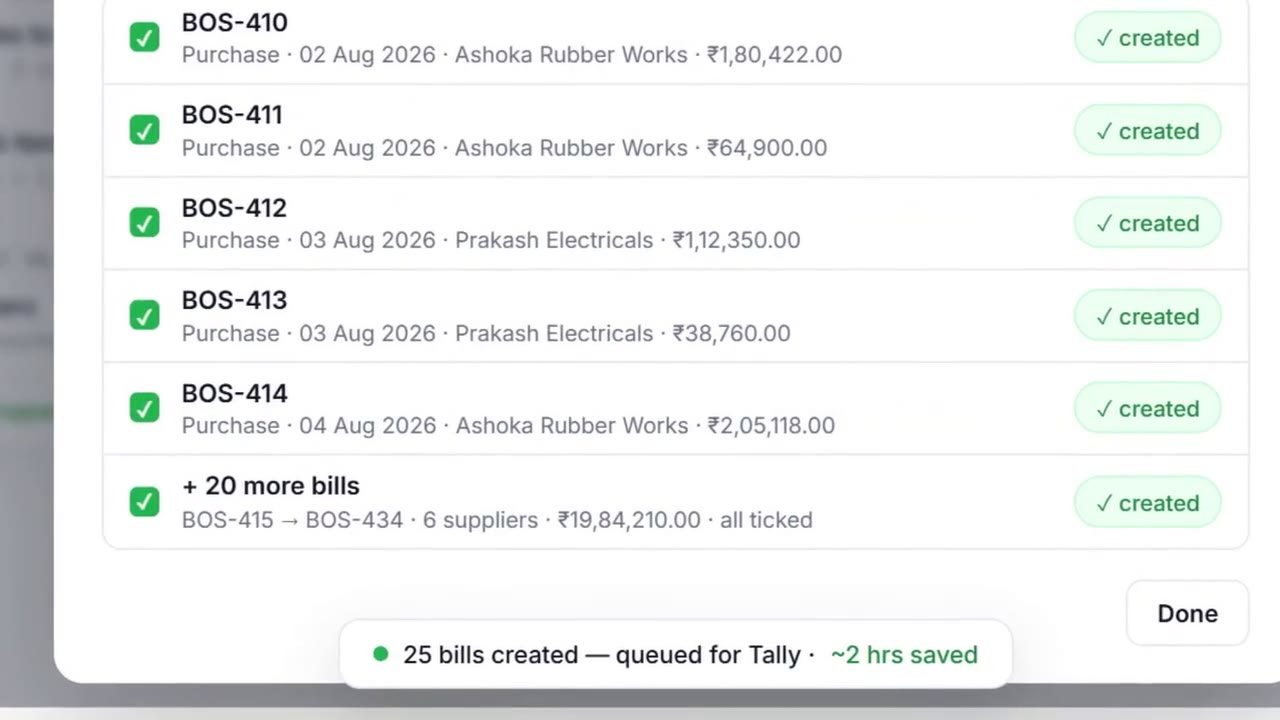
AI OCR · photo · PDF · Excel · CSVUpload up to 10 files at a time, or one register with a month of bills, and Riko drafts every bill, each listed with its number, date, supplier and amount. Untick any you want to hold, approve the rest, and hours of typing go to Tally on the next sync.
Batch draftingOn Basic you confirm your own entries. On Business and Teams your accountant proposes and the owner approves. Every posting is logged with who did what, and when.
Confirm · propose → approveIn Create Entry, open Upload and drop in a bill, invoice, register or statement: a phone photo, a PDF, or an Excel or CSV file, up to 10 at a time.
It finds the party, invoice number, date, items, tax and totals, and matches each to your own ledgers and stock items. Check each figure against the document shown beside it; pick or create a ledger where there is no match.
A register with a month of bills becomes a list of drafts, each with its number, date, supplier and amount, ticked and ready. Untick any you want to hold.
"Yes, create 25 bills." The vouchers are saved in Riko and listed under Created in Riko with a Pending push status. For a batch like that, Riko shows the time saved: about two hours of manual entry.
On the connector's next sync the vouchers reach your books, and each one keeps who created it, who approved it and when.
Month-end and 25 purchase bills are waiting to be keyed in.
Upload the stack, check the drafts, approve once. Around two hours of typing becomes a ten-minute review.
Suppliers send bills on WhatsApp and they never reach the accountant.
Save the bill, upload the photo to Riko, and the draft waits for approval. Nothing gets lost in a chat.
A client drops off a folder of bills every month.
An article uploads them, the drafts are matched to that client's Tally ledgers, and the manager approves before anything posts.
A bill, invoice, register or statement, as a PDF, a PNG or JPEG photo, or an Excel (.xlsx) or CSV file. Up to 10 files at a time.
The supplier, GSTIN, invoice number, date, line items, tax and totals. Riko then matches them to the party, item and tax ledgers you already have in Tally, and lets you pick or create one where there is no match.
No. Riko drafts the voucher and a person confirms it. On Basic you confirm your own entries; on Business and Teams the accountant proposes and the owner approves. Confirmed entries are saved in Riko and pushed to Tally on the connector's next sync.
You review every draft beside the document it came from, figure by figure, before anything posts. Fix it in place, then confirm.
It goes further. Plain OCR turns an image into text. Riko's AI also understands what each line is, matches it to your Tally masters and prepares the voucher, so the bill ends up as an entry, not a text file.
Yes. The log keeps who proposed each entry, who approved it and when.
Riko reads everything. It writes only what you approve.